








You run a shop, restaurant, or online store. Customers chat with you every day. But sending updates one by one takes too much time. LINE OA fixes that.
LINE OA stands for LINE Official Account. It is a free business tool inside the LINE app. You create one special account for your business. Customers add it as a friend. Then you can send messages, coupons, and news straight to their phones.
It feels like texting a friend, but it is for your business. Over 200 million people use LINE across Asia. Your messages pop up like push notifications. Most people open them. That is why smart shops use LINE OA to talk to customers fast and cheap.
In this guide, you will learn everything step by step. I will show you what it is, how to start, what it can do, and simple tips that work in 2026. You will finish this article ready to set up your own LINE OA today.
What Is LINE OA?
LINE OA is like a business profile on LINE. Normal LINE is for friends and family. LINE OA is only for shops, brands, and companies.
When someone adds your LINE OA as a friend, you can:
- Send broadcast messages to all friends at once
- Chat one-on-one with customers
- Give coupons and special offers
- Answer questions even when you sleep (with auto replies)
It keeps your personal LINE account separate. No mixing business chats with family photos.
LINE OA works on phones and computers. You manage everything from the free LINE Official Account Manager (the same place as manager.line.biz).
Why Should You Use LINE OA for Your Business?
Here are the big reasons small businesses love it:
- Fast and cheap marketing. One message reaches hundreds or thousands of friends. No need to pay for ads every time.
- Real chats with customers. People ask questions and buy right inside LINE. It feels friendly.
- Higher open rates. Email gets opened maybe 20% of the time. LINE messages get opened 80-90% of the time because they feel personal.
- Works 24/7. Set auto replies and greeting messages. Customers get help even at midnight.
- Builds loyalty. Send birthday coupons or “thank you” notes. Customers come back more often.
If you sell clothes, food, services, or anything in Thailand, Taiwan, Japan, or Indonesia, LINE OA is perfect. It is where your customers already spend time.
The Three Types of LINE OA Accounts Explained
You start with a free account. Later you can upgrade. Here is a clear table:
| Type | Badge Color | Best For | Can People Search for It? | Price to Get |
|---|---|---|---|---|
| Unverified | Grey | Small shops, testing | No (only by ID or QR) | Free |
| Verified | Blue | Most businesses | Yes | Buy Premium ID (~$20-30/year) |
| Premium | Green | Big brands | Yes | Higher fee + review |
Grey is fine to start. Blue makes you look professional and lets people find you by name. Green is for huge companies.
Most shops begin with Grey or Blue. It takes a few days to get verified. You send proof like business papers.
How to Create Your First LINE OA in 5 Easy Steps?
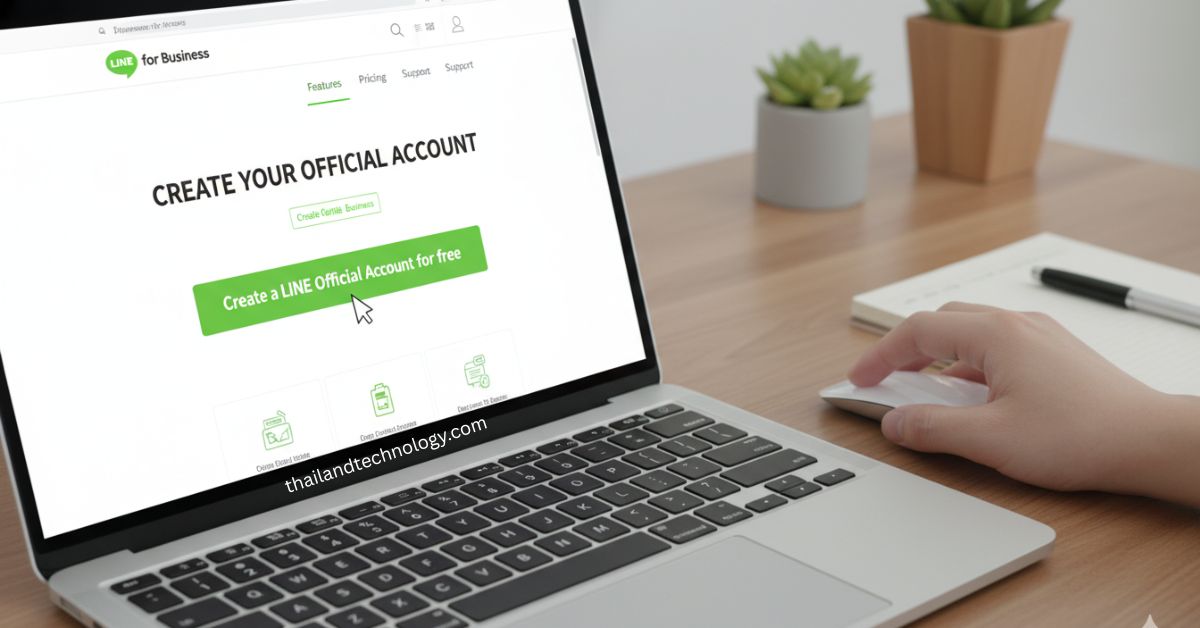
You can do this in 10 minutes. No special skills needed.
- Go to the official place. Open your browser and visit the LINE for Business site (the manager starts here). Click “Create a LINE Official Account for free.”
- Log in. Use your normal LINE account or make a free Business ID with your work email. Business ID is better so you do not mix personal stuff.
- Fill in details. Put your business name, email, and short description. Read the rules and click Confirm.
- Check and finish. Review everything. Click Complete. Your account is ready!
- Set basic profile. Add a clear photo, cover image, and short “about us” text. This is what new friends see first.
Done! Now you have your own LINE OA.
Next, get your QR code or link. Put the QR code on your shop door, website, or Facebook. People scan it and become friends.
Key Features of LINE OA You Can Use Right Away
These tools are free on every account.
- Greeting message. New friends get an automatic welcome. You can send text, picture, sticker, or coupon. Keep it short and friendly. Example: “Hi! Thanks for adding us. Here is 10% off your first order.”
- Rich Menu. A nice menu at the bottom of the chat. Customers tap buttons for “Menu”, “Price”, “Order”, or “Contact us”.
- Broadcast messages. Send news or offers to all friends or only some. Schedule them for later.
- Quick replies. Save common answers like “Our shop opens at 10 am.” Tap and send fast.
- Customer tags. Put labels on friends like “Bought shoes” or “Loves coffee.” Then send special offers only to them.
- Coupons and shop cards. Give digital coupons or loyalty points inside LINE.
- Rich messages. Send beautiful cards with pictures and buttons.
You can also add auto replies based on keywords. If someone types “price”, you send the price list.
Pricing Plans for LINE OA – Free and Paid Options
Everything starts free. You only pay when you send lots of messages.
| Plan | Monthly Fee | Free Messages per Month | Extra Message Cost | Best For |
|---|---|---|---|---|
| Free (Communication) | $0 | 500 | None (stops at limit) | Small shops |
| Light | $50 | 10,000 | None | Growing businesses |
| Standard | $150 | 40,000 | $0.05 each | Big brands |
You can send more messages if you need. Most small shops stay on Free or Light and still grow well.
New Features and Updates in LINE OA for 2026
LINE keeps making it better. In 2026 you get:
- Better tagging from customer clicks and website visits
- Easy polls and surveys inside chat
- New call feature (voice or video calls from customers)
- Tracking tags so you see which links customers tap
- Stronger chatbot tools with more games and rewards
These help you know what customers like and send better offers.
Best Practices to Get More Friends and Sales with LINE OA
Want fast results? Do these simple things:
- Post your QR code everywhere – shop, Instagram, website, receipts.
- Send one useful message per week. Too many and people unfriend you.
- Use tags to send personal offers. “Hi John, your favorite shirt is back in stock!”
- Add fun games like scratch cards or lucky draws. People share them and bring new friends.
- Answer chats fast. Even with auto replies, check daily.
- Track what works. See which messages get the most clicks.
Start small. One good coupon can bring 50 new friends in a week.
LINE OA vs WhatsApp Business: Quick Comparison
Many people ask which is better. Here is the easy difference:
- LINE OA is stronger in Japan, Thailand, Taiwan, Indonesia. WhatsApp is bigger in India, Brazil, Europe.
- LINE OA has richer menus, games, and loyalty cards built-in.
- Both let you chat and send broadcasts.
- LINE OA feels more fun for promotions. WhatsApp feels more private.
If your customers already use LINE, choose LINE OA. You can use both if you sell in many countries.
How to Track Your Success and Get Good ROI from LINE OA?
ROI means return on investment – how much money you make back.
Easy ways to check:
- Count new friends each month.
- See how many people open your messages (the manager shows this).
- Track coupon redemptions.
- Ask in chat: “How did you find us?”
Many shops see 3-5 times return. Example: Spend $50 on Light plan and send coupons. If 20 people buy $30 each, you made $600. That is good ROI.
Check numbers every month and change what does not work.
Common Problems and How to Fix Them
- Not enough friends. Fix: Share QR code more and give a small gift for adding you.
- Messages get ignored. Fix: Make them short and useful. Add pictures.
- Too many messages to answer. Fix: Set auto replies and tags.
- Account not verified. Fix: Buy Premium ID and send business papers. It takes 3-7 days.
These are easy fixes. Most people solve them in one day.
FAQs about LINE OA
Is LINE OA really free? Yes. You can create and use it forever for free with 500 messages per month.
Can I use it in Bangladesh or other countries? Yes. LINE OA works worldwide, but it is most popular in Asia.
Do I need coding skills? No. Basic features need no code. For fancy chatbots, you can use simple third-party tools.
How many messages can I send? Free plan: 500 per month. Paid plans give thousands more.
Can customers block me? Yes, but if you send useful messages they almost never do.
Is it safe for customer data? Yes. LINE follows strong privacy rules.
What if I make a mistake? You can edit messages and settings anytime. Start small and test.
How long does verification take? Usually 3-14 days after you send papers.